I recently listened to The Tim Ferriss Show episode #843, “Tactics and Strategies for a 2026 Reboot,” featuring Greg McKeown, the author of Essentialism. My biggest takeaway was simple but sticky:
Focus on what is essential and make those things effective.
That idea hit at the right time. I will be going on a journey with my team to apply this way of thinking systemically across our agency. As I find tactics that feel broadly useful, I will share them publicly.
This post is one of those tactics. It is small, practical, and immediately useful: moving around your computer faster.
I am on a Mac, so everything here is Mac-focused, but most of this translates easily to Windows or Linux.
Start With the Obvious (That Many People Still Miss)
I am always surprised by how many people do not know or do not use basic keyboard shortcuts:
- CMD + TAB to switch between recently used apps
- CMD + SPACE to open Spotlight and search apps and files
If you work on a computer for a living and do not know these, stop reading and learn a handful of shortcuts first. The time savings compound faster than you think.
Going One Level Deeper: Raycast
Once you have outgrown Spotlight, check out Raycast:https://www.raycast.com/
I have completely replaced Spotlight with Raycast, so CMD + SPACE now opens Raycast instead. It does far more than Spotlight:
- App launching
- File search
- Window management
- Custom workflows
- AI-powered actions (some paid)
I am on the free version, and it is already a massive upgrade.
One feature I use constantly is snippets. You can type a short trigger and Raycast pastes a longer block of text. I use this for:
- Repeated terminal commands
- Common responses
- Frequently reused AI prompts
This alone saves me dozens of small interruptions per day.
The Real Win: Making Caps Lock Useful Again
Now for the part that really changed how fast I work.
The Caps Lock key is basically useless for most people. Instead of letting it waste prime keyboard real estate, you can repurpose it.
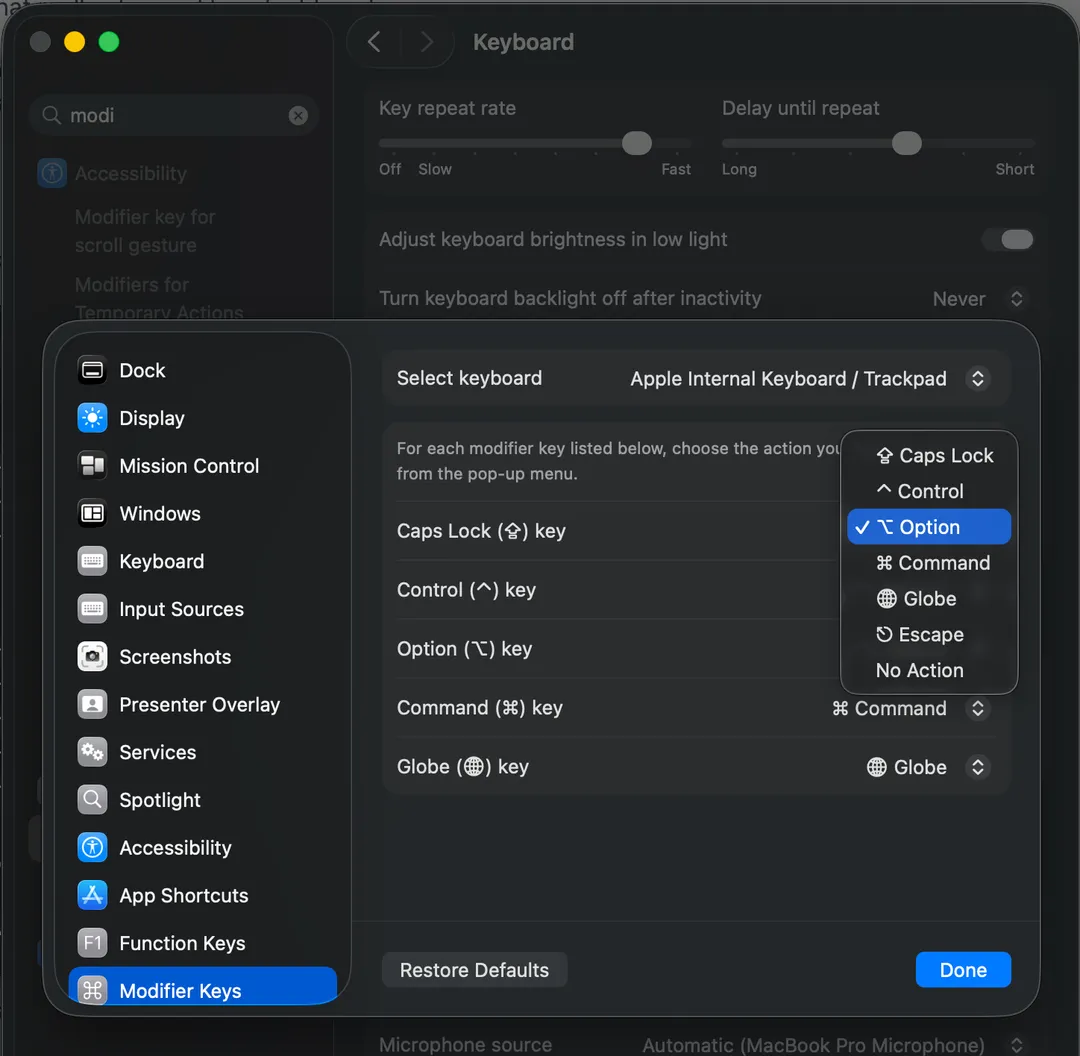
Step 1: Turn Caps Lock Into a Modifier Key
In Mac Settings → Keyboard → Modifier Keys, remap:
- Caps Lock to Option
Now Caps Lock behaves like a second Option key.
Step 2: Bind App Shortcuts in Raycast
Raycast lets you assign global shortcuts to actions like opening or switching to apps.
Here are some examples of how I use mine:
- Option + B for my browser
- Option + C for ChatGPT
- Option + E for my code editor
- Option + N for Notion
You can set these up however makes sense for you. The key insight is that your most-used apps should be one effortless chord away.
No dock. No mouse. No searching.
Why This Matters
Some people are skeptical about the return on effort here. Is this really worth setting up?
Yes, because:
- You remove friction from things you do hundreds of times a week
- You stay in flow longer
- You waste less mental energy on navigation
This is not really about Raycast, keyboard shortcuts, or even your computer.
It is about deeply learning the tools you use every day.
If you open the same handful of applications dozens of times a day, it is worth investing the time to understand them at a deeper level. Shortcuts, workflows, and small automations turn tools from something you operate into something that actively supports how you think and work.
The benefits compound. Less friction means less context switching. Less context switching means more focus. More focus means better work.
This mindset applies well beyond your computer. The same principle works for anything you use regularly: your calendar, your note-taking system, how you plan your week, even how you structure your mornings. Identify what is essential, then make those things easier and more effective.
That is what stuck with me from the idea of essentialism. Small, intentional improvements in the things you rely on most can quietly change the pace and quality of your day.
Note: This is not a sponsored post. I am not affiliated with Raycast and am sharing this purely because it has been useful to me.